
MicroMVDs for exchange requirements
To guarantee correct BIM data, data exchange requirements need to be specified and audited. A MicroMVD is a collection of sentences that describe auditing requirements, written in plain language understood by both technical and non-technical stakeholders. These sentences are organised into categories, and can be processed by a computer to automatically check whether or not the requirements are satisfied.
This approach builds on the concept in software development called unit testing, specifically behavior driven development. Describing the requirement in simple to understand (but still machine readable) gherkin format makes the intentions clear to designers and makes writing unit tests simple.
BIMTester has implemented use of MicroMVDs for auditing model quality from IFC files. BIMTester is integrated into Bonsai
Here is an example of a simple MicroMVD, which checks that an IFC4 file is provided.
Feature: Project setup

In order to view the BIM data
As any interested stakeholder
We need an IFC file

Scenario: Receiving a file
 * IFC data must use the "IFC4" schema
This MicroMVD is stored in a simple text file with the .feature file extension. The file name is arbitrary, but may be used to describe what it is auditing. These simple text files can be edited in any text editor, such as Vim, Apple TextEdit, or Microsoft Notepad. No proprietary software is required: anybody can read and write MicroMVDs.
These *.feature files, each containing sentences like the above can be processed by a computer. In the example above, a MicroMVD auditing program will check that a particular IFC file uses the IFC4 schema. The MicroMVD auditing program can then generate a report, which can be used by stakeholers to track whether or not a project is satisfying its requirements.
Unlike other auditing solutions like Solibri or SimpleBIM, MicroMVDs are non-proprietary, do not expire, are free, much lighter, are easy to change and develop, and are cross-platform.
List of MicroMVDs
Although you are free to write your own MicroMVD specific to your project, a series of MicroMVDs have been published online that address common problems. You can copy and paste these templates into your own *.feature files, and modify it to suite your project.
Subpages
- Classification MicroMVD
- COBie MicroMVD
- Construction sequencing MicroMVD
- Construction types MicroMVD
- Element classes MicroMVD
- Excavation MicroMVD
- Geocoding MicroMVD
- Geolocation MicroMVD
- Geometric detail MicroMVD
- Grids MicroMVD
- Levels MicroMVD
- Model federation MicroMVD
- Naming MicroMVD
- Project setup MicroMVD
- Quantity take-off MicroMVD
All MicroMVD can be found in MicroMVD
Auditing BIM data with Bonsai and MicroMVDs
To begin auditing BIM data, you will need an IFC file. Let’s imagine you have a file called file.ifc.
You will then need to specify your exchange requirements. Follow the steps below:
- Create a new text file called
audit.feature - Copy a MicroMVD template (e.g. Project setup MicroMVD) into your
audit.featurefile. - Modify the template based on your project. For example, you may change the sentence
* IFC data must use the "{schema}" schemato read* IFC data must use the "IFC4" schema.
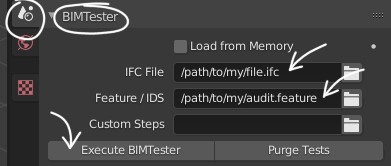
Now that you have specified your exchange requirements, you can audit it using a program. One free and open source option is BIMTester, which comes with Bonsai, or can be run standalone. Here’s an example of how to audit it:
- Launch Blender with Bonsai installed.
- Open up the BIMTester panel in the Scene Properties.
- Navigate to your
file.ifcfile in the IFC File property. This is the IFC that will be audited. - Navigate to your
audit.featurefile in the Feature / IDS property. This is your audit requirements file. - Press the
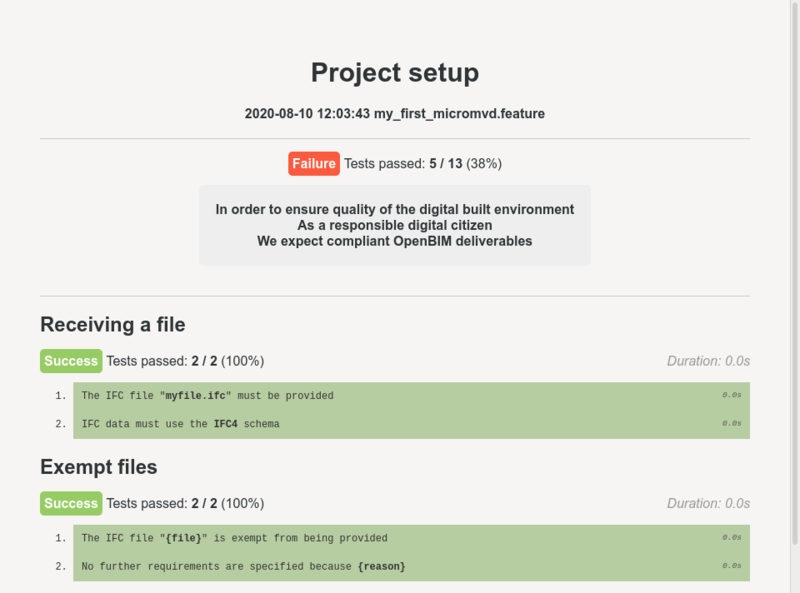
Execute BIMTesterbutton. - Your audit report results will pop up in your browser.
The Custom Steps is for advanced users who have built their own custom requirements. This requires coding knowledge.
Modifying a MicroMVD
MicroMVDs are designed to be modified to be specific to your project. You are free to delete lines that don’t apply to your project, or add additional lines if you need to audit more things in your project. You can have a single .feature or multiple files for each IFC, depending on how you want to organise your project. Once you have tailored it to your project, it is encouraged to include it in your project contract, so that all stakeholders are crystal clear on exactly what the data exchange requirements are, and how it will be audited.
If you know how to code, you can also define your own sentences. Read more in Developing custom MicroMVDs.